Physical Address
124 City Road, London EC1V 2NX
Physical Address
124 City Road, London EC1V 2NX
You sit down to write to your list. The blank page wins, so you open an AI tool, ask for a friendly email about your new resource, and get one back in about nine seconds.
It reads fine. It is clean, warm, correctly punctuated, and completely interchangeable with an email from someone selling insurance.
That is the real problem with AI email writing. Not that it produces something bad. It produces something fine, which is much harder to spot and much easier to send.
✅ Quick Answer: Use AI for the first version, not the thinking. Give it your reader, your goal, and a sample of how you write. Then add one thing only you could have written: a real example, a real opinion, or a real detail from your week. That single addition is what stops it sounding like everyone else.
Worth being clear about this, because the honest answer is “quite a lot.”
AI is good at the jobs that have nothing to do with your judgement.
✅ Turning a scribbled note into a structure.
✅ Getting a first sentence down so the page stops being blank.
✅ Offering ten subject lines when you have thought of one and hated it.
✅ Shortening a paragraph that got away from you.
✅ Explaining a term you have been nodding along to for a month.
Those are all real time savers, and none of them ask the tool to know anything about you.
The trouble starts at the next step, when the draft looks finished. A clean draft feels like a finished job in a way a messy one never does, and that feeling is the thing to distrust. It is the same pattern behind why AI makes things up and states it confidently.
Polish is not proof. It is just polish.
Here is the split that makes the whole thing work.
AI writes the version. You supply the specifics.
A reader does not open your email because the writing is tidy. They open it because a particular person is on the other end of it, and they want to know what that person thinks. The tool cannot fake that, because it does not have access to it.
So before you send, find at least one of these in your draft:
If a draft has none of those, it is not finished. It is a template with your name at the bottom.
These come up again and again in AI-written emails, and every one of them is fixable in about a minute.
This infographic lays out the swap:
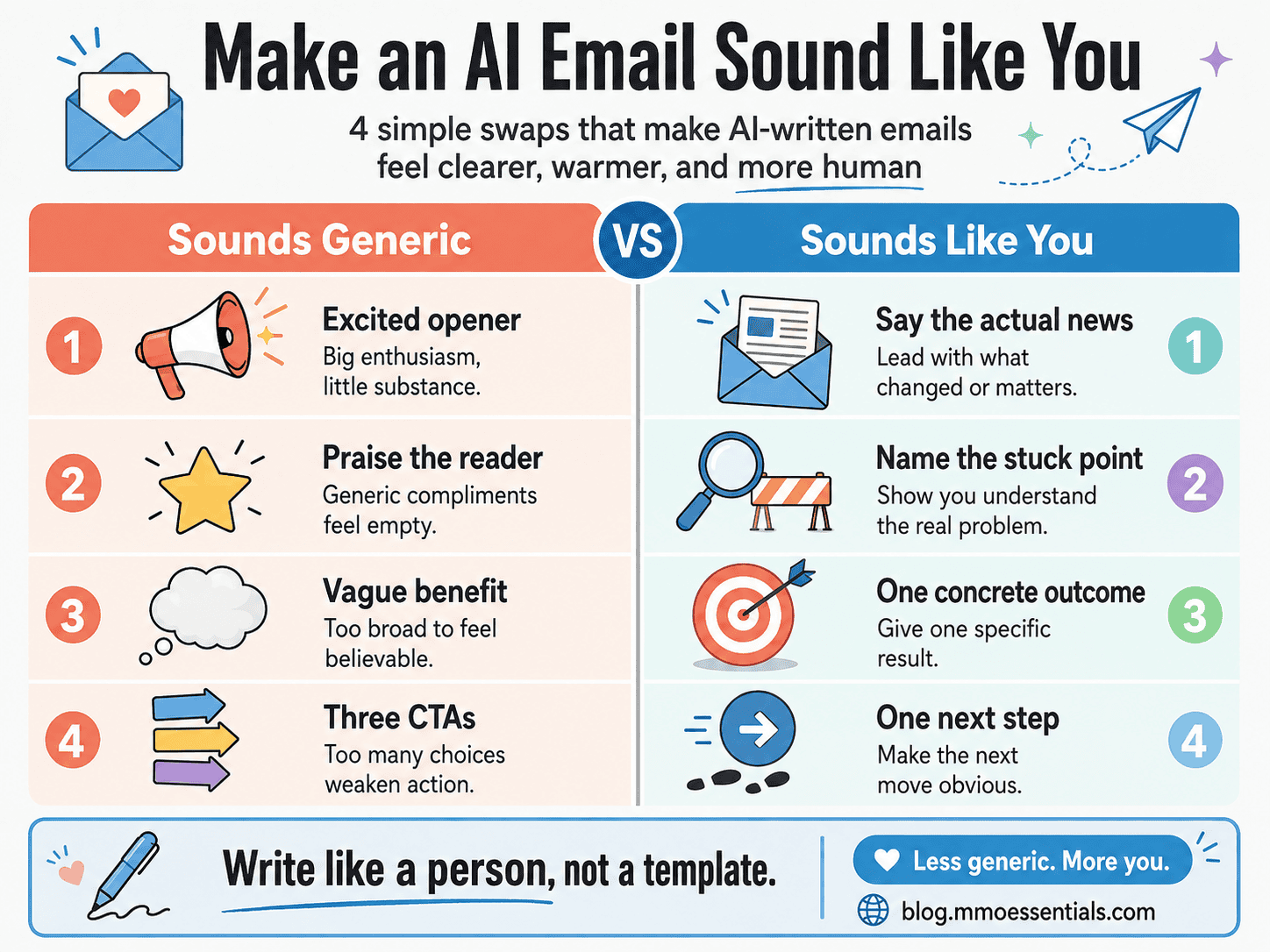
1️⃣ The excited opener. “I am so excited to share this with you.” Nobody has ever been persuaded by someone announcing their own excitement. Say the actual news instead.
2️⃣ Praise the reader has not earned yet. “As someone serious about growing their business…” The reader knows you do not know that. Name what they are stuck on instead. That, they will recognise.
3️⃣ The benefit with no edges. “This will help you take your content to the next level.” Which level? Swap it for one concrete thing they will be able to do afterwards.
4️⃣ Three calls to action in one email. Read the post, reply with your thoughts, and grab the guide. Pick one. An email with three next steps usually gets none of them.
🚫 Asking for “an email” with no context. Fix: say who it is for, what they already know, and what you want them to do next. A vague request produces a vague email on every tool there is.
🚫 Sending the first draft because it reads well. Fix: read it as if it arrived from a stranger. Would you keep reading past line two if it was not yours?
🚫 Letting AI invent the proof. Fix: every number, result, and example in an email has to be real. If you do not have one yet, write the email without it. A missing statistic is survivable. An invented one is not.
🚫 Writing to “my audience” instead of one person. Fix: picture one real reader and write to them. This single change does more for the tone than any prompt trick.
🚫 Automating a sequence you have never sent manually. Fix: send it by hand first and watch what happens. Do not automate confusion, because automation only makes an unclear message arrive faster.
For MMO Essentials, I use Systeme.io to hold the list itself, send the emails, and handle tags and follow-up sequences. The AI tool writes a draft. The email platform is the thing that actually owns the relationship, and those are two very different jobs.
Some tool links I share may be affiliate links, which means I may earn a commission if you choose to use them, at no extra cost to you. I only mention tools when they fit the beginner-friendly system I am explaining.
At MMO Essentials, my method is:
SMS: Start It → Master It → Scale It
Start It by using AI on one email you already needed to write this week, not a whole sequence.
Master It by sending that email, reading it back the next day, and noticing the one line that did not sound like you. Fix that line in the next one.
Scale It only once you know what your own emails sound like, because that is the thing a sequence multiplies.
You do not need to automate everything at once. Start with the part that helps your reader most. Then build from there.
If you are new to MMO Essentials, you can read more about the beginner-friendly approach on my About page. You can also explore the full MMO Essentials Foundations Library if you want to choose your first free workbook.
The tool is not the problem. Handing it the wrong job is.
Let it beat the blank page, suggest the subject lines, and tighten the paragraph that rambled. Then take back the part it was never able to do: the example, the opinion, the one specific thing that could only have come from you.
One real sentence in an otherwise ordinary email will do more than a perfect draft with nothing of you in it.
Start with the full guide: AI Limitations: Where the Tool Stops and You Start
Related reading:
👉 AI Hallucination: Why AI Makes Things Up and How to Spot It
👉 Is ChatGPT Plus Worth It? What to Check Before You Pay
👉 Why AI Writing Sounds Generic
🎁 This post shows you where the line sits. The free AI Tools Foundations workbook is where you draw it for your own work.
Inside, Part 2: Give Clear Instructions contains the Simple Prompt Builder, the fill-in-the-blank request that stops you asking for “an email” and getting one back that could belong to anyone. Part 4: Add Your Human Touch is the page that turns a clean draft into yours, with the before-and-after that shows exactly what the swap looks like. And Day 5 of the 7-Day Starter Plan is a single job: add the human layer to one real thing you have already drafted.
The whole workbook is free. You get a short preview on the page, then you add your email to carry on reading it. You can download the PDF as well if you would rather work through it offline.
Get the free AI Tools Foundations workbook →
No hype, no pressure, just the honest starting point most guides skip.
It can write a first version. That is genuinely useful, and it is not the same as writing your email. The tool does not know what happened in your week, which reader replied to you last month, or what you actually think about the thing you are recommending. It fills the page. You make it worth opening.
Not from the grammar. They notice it from the absence of anything specific. No example, no opinion, no detail that could only have come from you. If a paragraph could sit in any other person’s newsletter without changing a word, that is the part a reader feels, whether or not they could name why.
No. A dedicated AI email assistant is a separate subscription solving a problem you probably do not have yet. A free general AI tool handles first drafts perfectly well, and the part that decides whether your email works is not the drafting.
Give it more to work with before you ask. Who the reader is, what they already know, what you want them to do next, and a sample of how you actually write. Then add the thing the tool could never supply: your own example. Context in, judgement after.


[…] Hallucination: Why AI Makes Things Up and How to Spot It👉 AI Email Writing: How to Sound Like You, Not Everyone Else👉 What Is Prompt Engineering? The Honest, Simple […]