Physical Address
124 City Road, London EC1V 2NX
Physical Address
124 City Road, London EC1V 2NX
Most people open ChatGPT for the first time, type something polite, get a friendly paragraph back and then just sit there.
Now what?
So they look up a tutorial. It lists forty things the tool can do. They try six of them, save a few prompts, and a week later they have learned a lot about ChatGPT and finished nothing.
That is not a you problem. Most advice on ChatGPT for beginners simply starts in the wrong place, and the fix is simpler than any tutorial.
✅ Quick Answer: Start with one real task you already need doing this week, like outlining a blog post or rewriting a clunky paragraph. Use the free plan. Tell it clearly what you want, then read the answer as if a stranger wrote it. Learn ChatGPT through that one task, not through a list of features.
ChatGPT gives you an empty box and no instructions. It can do almost anything, which sounds helpful and in practice leaves you with no idea where to start.
The advice doesn’t help much either. Most beginner guides answer “what can ChatGPT do?” with a giant list. That is like being handed a full toolbox when all you wanted was to hang one picture. You spend the afternoon admiring the spanners.
The real skill is not knowing every feature. It is knowing what to hand the tool, and what to keep for yourself. You only learn that by using it on something that matters.
Most beginners pick a tool first and then look for things to do with it. Flip that round. Pick the task first, and use the tool to help with it.
A good first task has four things going for it:
1️⃣ You need it done anyway. Not an experiment. A real job from this week.
2️⃣ It fits in one sitting. Something you can finish and use today.
3️⃣ You can tell if the answer is any good. If you know the topic, you will spot what is wrong.
4️⃣ A mistake costs you nothing. Start where a bad answer is just a bad draft, not a problem.
This infographic shows the difference between a good first task and a frustrating one:
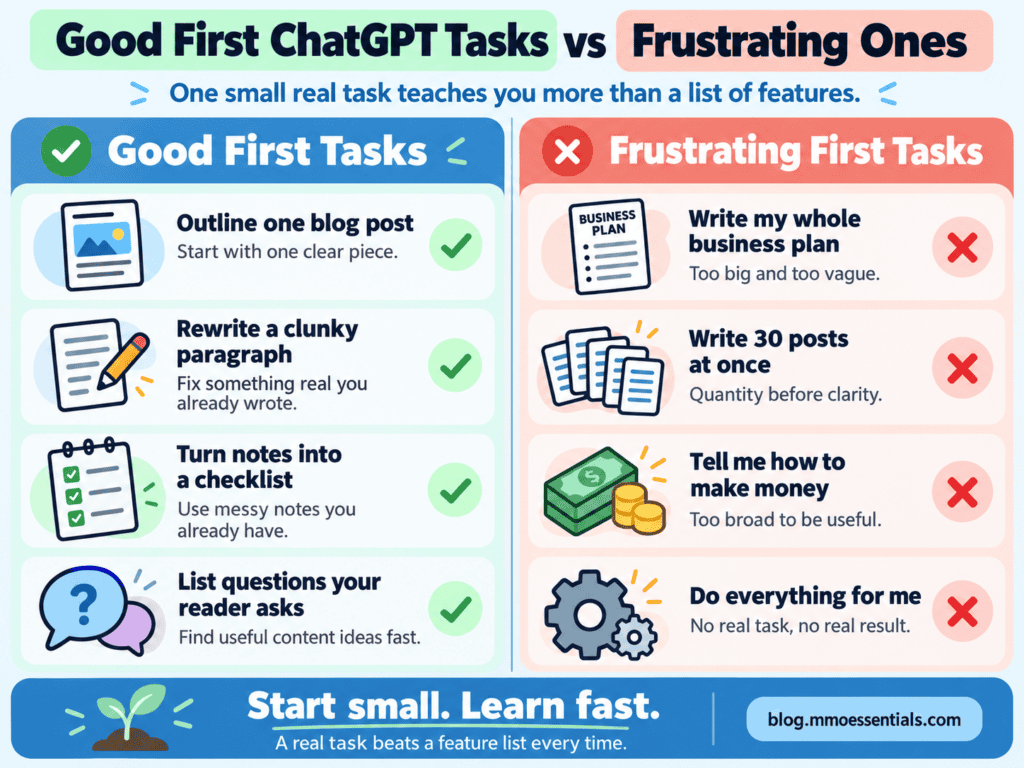
Notice what the frustrating ones have in common. They are too big to check. When you can’t tell whether the answer is right, you can’t learn anything from it.
ChatGPT doesn’t know who you are, who your reader is or what you want the finished thing to do. If you don’t tell it, it guesses. And its guesses sound like everyone else.
Here is the same request, asked two ways.
Vague: “Write a blog post about email lists.”
Clearer: “Help me outline a blog post about why an email list matters. The reader is new to online business. Keep it friendly and plain. Give me five section headings with one line under each.”
The second one tells it who the reader is and what shape the answer should take. The answer will be far closer to what you need, and you didn’t need any special tricks to get there. If you want to know why, I explain it properly in the post on what prompt engineering really is.
Then comes the part most people skip. Read the answer as if someone else wrote it. Check anything that sounds like a fact, because AI can be confidently wrong. Rewrite any line you would never actually say.
Not to start. OpenAI’s pricing page lists a Free plan with unlimited text chats, within its usage rules. That is plenty for outlines, rewrites, checklists and first drafts.
Paying makes sense once you are regularly running into limits on something you use every week. I went through how to decide in Is ChatGPT Plus Worth It?
One thing worth doing on day one, whichever plan you use: check the setting that decides whether your chats are used for training. It takes about a minute, and I show you where it is in Is ChatGPT Safe?
🚫 Trying every feature in the first week. Fix: use one feature on one task until it feels normal. The rest can wait.
🚫 Switching to a new AI tool every time one is hyped. Fix: stay with one tool long enough to get good at it. Most of the skill carries over anyway.
🚫 Asking one-line questions. Fix: add who it is for, what you want back and the tone. Two extra sentences change the whole answer.
🚫 Using the first answer as it is. Fix: treat it as a first draft. Check it, then make it sound like you.
🚫 Paying before finishing anything. Fix: finish a few real tasks on the free plan first. Then you will know what you would actually be paying for.
At MMO Essentials, my method is:
SMS: Start It → Master It → Scale It
Start It by choosing one small task you need doing this week and using ChatGPT for that alone.
Master It by repeating the same task a few times, improving how you ask and how you check the answer.
Scale It by adding a second task only once the first one is quick and reliable.
You do not need to automate everything at once. Start with the part that helps your reader most. Then build from there.
If you are new to MMO Essentials, you can read more about the beginner-friendly approach on my About page. You can also explore the full MMO Essentials Foundations Library if you want to choose your first free workbook.
You don’t need to learn ChatGPT. You need to use it once, properly, on something real.
Pick the task. Ask clearly. Check what comes back. Next week, do it again a little better. That is how the tool stops being a blank box and starts being useful.
One finished task beats forty saved tips.
Start with the full guide: AI Limitations: Where the Tool Stops and You Start
Related reading:
👉 What Is Prompt Engineering? The Honest, Simple Answer
👉 Is ChatGPT Safe? What You Should Never Put Into an AI Tool
👉 Is AI Content Bad for SEO? What Google Actually Says
🎁 This post helps you pick your first task. The free AI Tools Foundations workbook walks you through doing it.
Part 1: Choose the Right Task helps you sort a good starting job from one that will only frustrate you. The Simple Prompt Builder in Part 2 gives you a fill-in-the-blanks way to ask clearly, so you are not starting from an empty box. And the One-Task Action Plan in the Reader Toolkit, together with Day 1 of the 7-Day Starter Plan, turns this whole post into something you can do today.
The whole workbook is free. You get a short preview on the page, then you add your email to carry on reading it. You can download the PDF as well if you would rather work through it offline.
Get the free AI Tools Foundations workbook →
No hype, no pressure, just the honest starting point most guides skip.
Pick one small task you already need doing, like outlining a blog post or tidying a rough paragraph. Tell it who the work is for and what you want back. Then read the answer carefully, fix what is wrong and rewrite what does not sound like you. That one loop teaches you more than any feature list.
It is best at first drafts and tidying up: outlines, rewrites, checklists, subject line ideas, reader questions and simple explanations. It is not good at knowing your business or your facts unless you tell it, and it can be confidently wrong, so everything it gives you still needs checking.
Yes. OpenAI’s pricing page lists a Free plan with unlimited text chats, within its usage rules. Paid plans add more uploads and more advanced models, but none of that is needed to learn the basics.
Not a long one. You need to know where to type and where the privacy setting is. After that, one real task teaches you faster than a tutorial, because you learn what you actually need rather than everything the tool can do.




[…] 👉 AI Hallucination: Why AI Makes Things Up and How to Spot It👉 Is ChatGPT Safe? What You Should Never Put Into an AI Tool👉 What Is Prompt Engineering? The Honest, Simple Answer👉 ChatGPT for Beginners: Pick One Task, Not One Tool […]
[…] Hallucination: Why AI Makes Things Up and How to Spot It👉 ChatGPT for Beginners: Pick One Task, Not One Tool👉 Prompt Engineering, Explained Without the […]