Physical Address
124 City Road, London EC1V 2NX
Physical Address
124 City Road, London EC1V 2NX
Somebody in a forum tells you AI tools are harvesting everything you type. Somebody else tells you it is all completely private and to stop worrying. A third person says they would never touch it for anything to do with their business.
That is not what we are doing here.
The question “is ChatGPT safe” is worth asking, and the useful answer is not a yes or a no. It is a setting, a short list, and about four minutes of your time.
✅ Quick Answer: Safe enough for normal business work. Two things are worth doing. Turn off the training setting in Data Controls, which takes about a minute. Then keep a short list in your head of what never goes in: passwords, customer details, anything financial, and anything that belongs to someone else.
The word “safe” is doing too many jobs in that question, which is why the answers are so contradictory.
People are usually asking one of three separate things.
So the honest answer is that the tool is not dangerous. What you feed it is a choice, and that choice is currently being made by a default setting you probably have not looked at.
Here is the part that surprised me when I read it properly, straight from OpenAI’s own documentation.
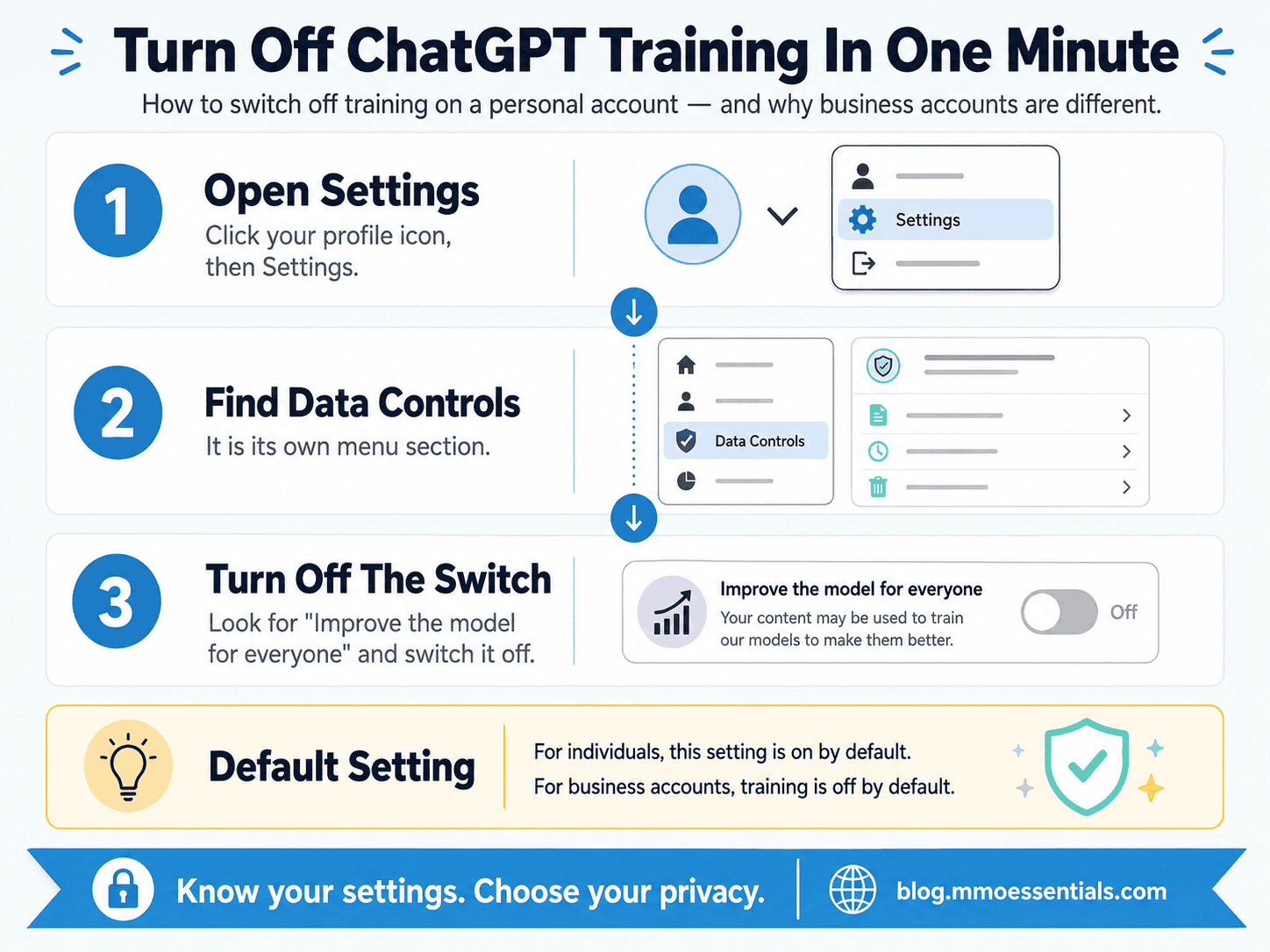
If you use a personal ChatGPT account, free or paid, your conversations are used to help train the model unless you opt out. OpenAI’s help centre puts it plainly: ChatGPT “improves by further training on the conversations people have with it, unless you opt out”.
Now read what the same page says about business accounts:
“By default, we do not train on any inputs or outputs from our products for business users… Unless they explicitly opt-in, organizations are opted out of data-sharing by default.”
Look at those two defaults side by side. A company gets privacy without asking. An individual has to go and find a menu.
That is not a scandal, and it is not hidden. It is written on a public help page anyone can read. But it does mean the person least likely to know the setting exists is the one it is switched on for.
Two things worth knowing once you have flipped it.
It is not retroactive. OpenAI’s wording is that once you opt out, new conversations will not be used. Anything you have already typed has already been through.
Thumbs up and thumbs down override it. The same page says that even with training off, if you rate a response, “the entire conversation associated with that feedback may be used to train our models.” So the little feedback buttons are a live switch, not a neutral one. Worth knowing before you tap them out of politeness.
There is also Temporary Chat, which sits in the top right of the chat screen. Those conversations stay out of your history, create no memories, are not used for training, and are deleted after 30 days. That is the right tool for the one-off question you would rather not keep.
Settings are the easy part. The judgement is the part that stays yours.
Nothing on this list is about paranoia. It is about the difference between your own information and other people’s.
🚫 Passwords, logins, API keys. No exceptions, no “just this once to check the format.”
🚫 Customer names, emails, addresses, order details. This is the one beginners paste without thinking, usually while asking for help writing a reply. Take the details out first and describe the situation instead.
🚫 Anything financial. Card numbers, bank details, real revenue figures tied to a named person or business.
🚫 Confidential documents and signed agreements. If you agreed to keep something private, pasting it in is you breaking that agreement, not the tool doing anything wrong.
🚫 Someone else’s unpublished work. A client’s draft, a colleague’s document, a private message somebody sent you.
The test that covers all of it: if it belongs to another person, it is not yours to paste. Your own half-finished blog post is fine. Your customer’s address is not.
🚫 Deciding the whole tool is unsafe and avoiding it. Fix: the risk is in specific inputs, not the tool. Avoiding it entirely costs you the drafting help and protects nothing you were not already protecting.
🚫 Assuming a paid plan means private. Fix: paying more does not change the training default on a personal account. Only the setting does, and only business plans are opted out automatically.
🚫 Pasting a customer email to get help replying. Fix: describe the situation in your own words. “A customer is unhappy about a delayed download” gets you the same answer without handing over their details.
🚫 Checking the setting once and forgetting it. Fix: have a look after any major update, and remember the feedback buttons are their own thing.
🚫 Confusing safe with correct. Fix: your data being handled properly says nothing about whether the answer is right. Those are two separate checks and you still need both.
At MMO Essentials, my method is:
SMS: Start It → Master It → Scale It
Start It by spending one minute in Data Controls today, before you use the tool for anything else.
Master It by getting into the habit of stripping names and numbers out of anything you paste, until you stop having to think about it.
Scale It by writing your own short list down once you know what your business actually handles, because yours will be more specific than mine.
You do not need to automate everything at once. Start with the part that helps your reader most. Then build from there.
If you are new to MMO Essentials, you can read more about the beginner-friendly approach on my About page. You can also explore the full MMO Essentials Foundations Library if you want to choose your first free workbook.
Safe enough, once you have made two decisions instead of letting a default make them for you.
Change the setting. Keep the short list. Then get on with the work, because the actual risk to a new online business was never that a chatbot read your blog outline. It is spending another month researching tools instead of finishing something.
Careful is a minute of your time. Frightened is a month of it.
Start with the full guide: AI Limitations: Where the Tool Stops and You Start
Related reading:
👉 AI Hallucination: Why AI Makes Things Up and How to Spot It
👉 AI Email Writing: How to Sound Like You, Not Everyone Else
👉 Is ChatGPT Plus Worth It? What to Check Before You Pay
🎁 This post covers what to keep out. The free AI Tools Foundations workbook covers what to put in.
Inside, Part 2: Give Clear Instructions has the Simple Prompt Builder, which is useful here for a reason people miss: a well-built request describes the situation instead of pasting the raw document, so you hand over less by default. Part 3: Review Before You Use is the page that stops a confident answer going straight into your business unchecked. And the Common AI Tools Mistakes section lists sharing sensitive information alongside the other habits worth breaking early.
The whole workbook is free. You get a short preview on the page, then you add your email to carry on reading it. You can download the PDF as well if you would rather work through it offline.
Get the free AI Tools Foundations workbook →
No hype, no pressure, just the honest starting point most guides skip.
For normal business work, yes. Drafting, outlining, explaining, rewriting, none of that puts you at risk. The care needed is not about the tool breaking. It is about what you choose to type into it, because on a personal account your conversations are used to train the model unless you turn that off.
Yes. Your conversations are kept and appear in your history. OpenAI’s own help pages say chats from individual accounts may be used to train its models unless you opt out, and that opting out applies to new conversations rather than ones you have already had.
Not as a browsable list, no. The realistic concern is not a stranger reading your chat window. It is that anything you paste in has left your control and now sits on someone else’s system under their terms, which is a different risk and a more boring one.
Passwords and logins, customer names and contact details, anything financial, signed contracts or confidential documents, and anything covered by an agreement you made with someone else. The simple version: if it belongs to another person, it is not yours to paste.