Physical Address
124 City Road, London EC1V 2NX
Physical Address
124 City Road, London EC1V 2NX

Open the folder where you keep your prompts. Go on.
If it has more instructions in it than finished pieces of work, that is the whole problem in one glance, and it is a very common one. Collecting feels like progress right up until you notice nothing came out the other end.
✅ Quick Answer: An AI workflow is one task you repeat, done the same way each time, with the request saved and improved as you go. Not software. Not automation. Just a job you have run enough times to know where it goes wrong. One of those beats fifty saved prompts, because the workflow finishes things and the folder does not.
Strip the word back, and it is unglamorous, which is why it does not sell well.

A workflow is a task you do more than once, done the same way each time. That is it. Writing your weekly email. Turning a finished post into three social captions. Drafting the reply to the question customers keep asking.
Notice what is not in that description. No software. No integrations. No monthly fee. A workflow written on the back of an envelope is still a workflow, and it will beat an unused subscription every week of the year.
The reason one of these outperforms a huge prompt library is that a workflow improves. You run it, something comes back slightly wrong, you adjust the request, and the next run is better. A saved prompt you have never run is frozen at the quality of the day somebody else wrote it.
When a request finally produces something you can use, capture it. Most people skip this and end up rebuilding the same instruction from memory a fortnight later, slightly worse.
Four things are worth keeping, and they take about two minutes.
1️⃣ The task. In plain words, what job this does. “Weekly email to the list about one idea.”
2️⃣ The request that worked. Not the first one you tried. The version you ended up with after fixing it.
3️⃣ What you changed. The single most useful line, and the one everyone leaves out. “Had to tell it to stop opening with a question.” That note is what stops you making the same correction forever.
4️⃣ What it produced. A link or a filename. If nothing goes in this box after a few attempts, that is your answer about whether the task was worth a workflow at all.
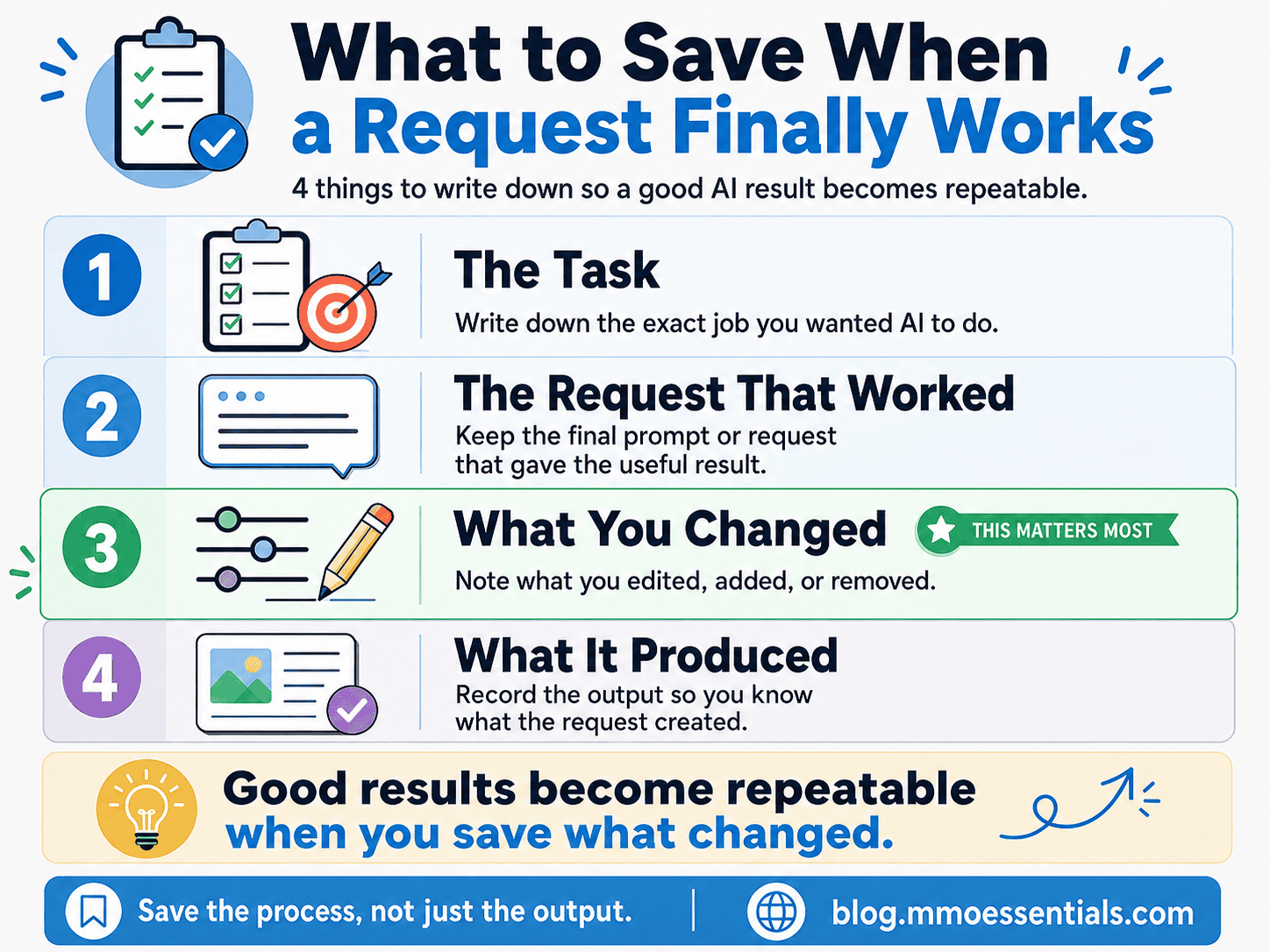
Four of these, covering your four most repeated jobs, is a working system. A thousand prompts is a library nobody visits.
There is a lot of marketing aimed at skipping this stage entirely.
A launch email I received recently offered a button you press once, after which the site improves itself every day, hands-free. Another promised five complete businesses built in about sixty minutes. Both are selling the same idea: that the repeated part is the problem, and the fix is to never have to do it.
But the repeated part is where you learn what the task actually needs. Run your weekly email four times, and you find out that the tool always makes it too formal, always buries the point, and always needs the specific thing you know about your reader. That knowledge does not exist before the fourth run. No button contains it.
This is why the phrase worth remembering is do not automate confusion. Automating a process you have not run yet does not save you the learning. It just makes an unclear thing happen faster and in more places, and now you have to unpick it from inside a tool you also do not understand yet.

Automation is genuinely useful. It is a later step, applied to something that already works. The difference between AI and automation is worth being clear on before you pay for either.
🚫 Collecting prompts instead of finishing work. Fix: for the next fortnight, save nothing you have not personally run. The folder shrinks and the output grows.
🚫 Building the workflow for a task you do once a year. Fix: workflows are for repetition. A one-off job just needs doing.
🚫 Buying software before the steps exist. Fix: run it manually four or five times first. If it is still worth doing then, you will know exactly which part to speed up.
🚫 Changing three things at once when a result disappoints. Fix: change one, run it again, see what moved. Otherwise you never learn which change did the work.
🚫 Treating the saved request as finished. Fix: it is a draft that gets better. Update it whenever you correct the same thing twice.
Once a workflow genuinely works by hand and you are repeating it every week, that is the point where software starts to earn its place.
For MMO Essentials, I use Systeme.io for email sequences, tags and follow-up, and PostSyncer for scheduling social posts once the writing is already done. Both of them automate a step I had been doing manually first, which is the only order I would recommend.
Some tool links I share may be affiliate links, which means I may earn a commission if you choose to use them, at no extra cost to you. I only mention tools when they fit the beginner-friendly system I am explaining.
At MMO Essentials, my method is:
SMS: Start It → Master It → Scale It
Start It with the single task you have already done twice this month, and write down the request you used.
Master It by running it three more times, changing one thing each time, and noting what you changed.
Scale It only once it works without you rethinking it, because that is the point where automation has something solid to speed up.
You do not need to automate everything at once. Start with the part that helps your reader most. Then build from there.
If you are new to MMO Essentials, you can read more about the beginner-friendly approach on my About page. You can also explore the full MMO Essentials Foundations Library if you want to choose your first free workbook.
The folder of prompts is not useless. It is just not a system, and it will never become one by getting bigger.
Pick the task you already repeat. Run it, fix it, write down what you fixed. Do that four or five times and you will have something a thousand downloaded prompts cannot give you: a job that reliably gets finished, in your voice, without you starting from nothing each week.
One that works beats fifty that might.
Start with the full guide: AI Limitations: Where the Tool Stops and You Start
Related reading:
👉 What Is Prompt Engineering? The Honest, Simple Answer
👉 AI Email Writing: How to Sound Like You, Not Everyone Else
👉 Is ChatGPT Plus Worth It? What to Check Before You Pay
🎁 This post explains the habit. The free AI Tools Foundations workbook is where you set it up.
Inside, Part 6: Save What Works is the four-column system behind the record card above, so your saved requests stop being a pile and start being a short, useful list. Part 7: Improve Through Real Use covers the one-change-at-a-time habit that turns a mediocre request into a reliable one. And the MMO Essentials Build Log is the page you fill in after each run, which is where the “what I changed” note actually lives.
The whole workbook is free. You get a short preview on the page, then you add your email to carry on reading it. You can download the PDF as well if you would rather work through it offline.
Get the free AI Tools Foundations workbook →
No hype, no pressure, just the honest starting point most guides skip.
It is one task you repeat, done the same way each time, with the request written down and improved as you go. That is the whole definition. It does not require software, a subscription, or anything connecting to anything else.
No, and the difference is worth keeping straight. A workflow is a repeatable process that you still run. Automation is a process that runs without you. A workflow can exist for months before any part of it is automated, and it usually should.
Far fewer than most people collect. Four or five, covering tasks you genuinely repeat every week, will do more than a folder of a thousand. If you cannot name what a saved prompt produced last time, it is not earning its place.
Not to start. Software connects steps together, which only helps once the steps exist and work. Buying it first means paying to speed up something you have not defined yet, which is how most tool spending goes wrong.